How Detection Engines Decide What Is Malicious
This article is advertising-funded. It recommends a product we hold a commercial affiliate agreement for, and every commercial link on the page is labelled partner link. If you buy after following one, the advertiser pays us a commission — your price is the same either way.
What that does not buy: a rating, a testimonial or a deadline. Read the editorial policy for what we refuse to publish, and the affiliate disclosure for how the money flows.
Every security product eventually has to answer one question about one file: run it, or do not. This guide walks through how that answer is produced, why no single technique is sufficient, and why the interesting engineering problem is not catching malware but avoiding the alarm that stops you working.
Signatures: exact, fast, brittle
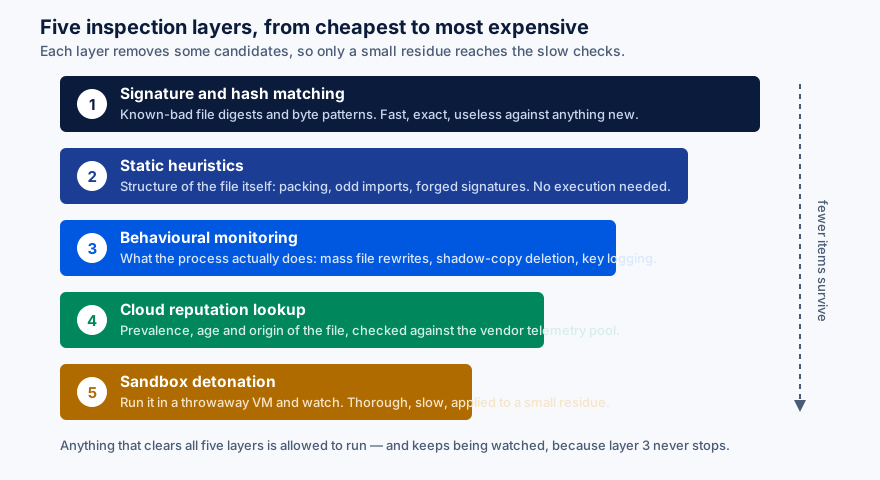
The original technique and still the first one applied. The engine computes a hash of the file, or looks for a distinctive byte sequence inside it, and compares against a list of known malicious values.
It is essentially free to run and produces no false positives worth speaking of, because a match is exact. Its weakness is equally absolute: changing one byte changes the hash. Malware authors automated that decades ago, which is why a signature database that grows every day still misses the sample written this morning.
Signature matching survives because a very large share of what circulates is recycled. Resolving that volume for almost no cost frees the expensive layers to work on what is actually new.
Static heuristics: reading without running
Here the engine parses the file and scores its structure. Typical signals:
- Packing and obfuscation. Legitimate software is sometimes compressed; multiple layers of unusual packing is much rarer outside malware.
- Imported functions. A small utility that imports the interfaces for reading keystrokes, injecting into other processes and opening network sockets has declared its intentions.
- Code signing. Absent, expired, self-signed, or issued to an entity with no history. Signing is not proof of safety — certificates get stolen — but its absence raises the score.
- Entropy and section layout. Encrypted payloads look statistically different from compiled code.
- Metadata inconsistencies. A file claiming to be a 2019 build of a known application, with a compile timestamp from last week and no matching version resource.
None of these is conclusive. Together they produce a number, and the number is compared against a threshold that the vendor tunes constantly.
A product that implements these layers
Surfshark sells its antivirus inside the Surfshark One bundle. We hold a paid affiliate agreement with the advertiser. Which layers any given product implements, and how well, is a question for independent lab reports — AV-TEST and AV-Comparatives publish theirs free.
See Surfshark AntivirusOpens in a new tab Partner link — opens surfshark.com via our redirect We earn a commission if you buy through this link. It costs you nothing extra and does not change the price you are quoted.Behavioural monitoring: watching what it does
This is where the category moved, and where it now does most of its useful work. Instead of judging a file, the engine observes a running process and matches its actions against rules describing malicious intent.
Some patterns are close to unambiguous:
- Enumerating every document on every drive, then rewriting them in sequence — ransomware, whatever the binary is called.
- Deleting Windows Volume Shadow Copies, or disabling recovery options. Almost nothing legitimate does this.
- Injecting code into a browser process and reading form fields before they are encrypted.
- Writing a persistence entry immediately after being downloaded, before the user has done anything.
- Contacting a domain registered four hours ago and receiving executable content.
Because these rules describe behaviour rather than files, they work against samples nobody has ever seen. That is the whole argument for the technique — and also the source of its cost, because a legitimate backup tool also reads every document on every drive, and an installer also writes persistence entries.
Cloud reputation: what does the world know about this file?
The client sends an identifier — typically a hash, sometimes structural metadata — to the vendor’s service, which answers with what its telemetry knows. Prevalence, age, first-seen geography, signer history.
The inference is statistical, not semantic. A file present on a hundred million machines for three years is probably fine. A file seen on nine machines, first observed twenty minutes ago, unsigned, is worth treating carefully even though nothing about it is provably bad.
Cloud reputation means metadata about files on your machine is transmitted to the vendor. Vendors differ in what they send, whether whole files are ever uploaded, how long the data is kept and whether it is shared. This is the single most important paragraph of a security product’s privacy policy, and the one worth actually reading before you install anything.
Sandboxing: run it somewhere that does not matter
For the small residue that survives everything above, the sample can be executed inside an instrumented virtual machine and its behaviour recorded. It is the most informative technique available and by far the slowest, so it is applied sparingly, often server-side.
Capable malware tries to notice. Checks for a small disk, absent mouse movement, known hypervisor artefacts or a suspiciously clean file system are routine, and a sample that detects analysis simply behaves itself until it is released. Sandbox evasion is an arms race, which is why sandboxing supplements the earlier layers instead of replacing them.
Why false positives are the hard part
It is straightforward to build an engine that catches essentially all malware: flag everything. The difficulty is doing it while almost never flagging something legitimate, and that constraint shapes every design decision above.
A false positive is not a cosmetic annoyance. It can quarantine a file a business depends on, break an update, or block a developer’s own build output. Its worst consequence is behavioural: a product that cries wolf teaches its user to click through warnings, and that user will click through the real one too.
This is why independent test reports publish a false-positive column alongside the detection column, and why reading only the detection figure gives you half the picture. A product at 99.6 per cent detection with a handful of false alarms is a different proposition from one at 99.8 per cent with dozens.
How to read a lab report
- Check the date. Results older than about six months describe a product that has since changed.
- Read the methodology. Real-world testing with full attack chains is a harder and more meaningful test than scanning a static malware collection.
- Read the false-positive table. Always.
- Check the performance test separately. It is usually published as its own document with the test hardware specified.
- Note who is absent. Participation is voluntary and costs money. Absence is not proof of a bad product, but it does mean nobody independent has measured it.
Sources
- AV-TEST — protection, performance and usability scores with published methodology.
- AV-Comparatives — real-world protection tests and separate false-alarm reports.
- SE Labs — testing using complete attack chains rather than isolated samples.
- MITRE ATT&CK — the public catalogue of adversary techniques that behavioural rules are written against.
Product behaviour changes without notice. Where anything here differs from a vendor’s own current documentation or terms, the vendor’s information prevails. Tell us about any divergence at info@savorin.online and we will correct the page.
Written by Isla Ward, Director of publication for BohDo Fast Transport s.r.o.. Published and last reviewed 22 September 2026. General information, not security advice tailored to your circumstances. All diagrams on this page are original SVG files produced for savorin.online. Editorial policy and corrections procedure.